Community centre bookings support
 Community spaces bookings update
 Existing customers
We recently moved to a new online booking system for community spaces.
If you had made a booking before Wednesday 20 May, it will have been added to the system already. You should have received emails to confirm this.
Before you can log in to online bookings, you will need to claim your account. Find out how to claim your account.
When you log in for the first time, please check your account details and upcoming bookings to make sure everything is correct. If you notice any mistakes, please contact the bookings team to let us know.
New customers
If you are a new customer and have not hired a community space before, you will simply need to create a new account to make an online booking.
Step-by-step guidance on how to use the new booking system is on this page.
On this page:
About the online booking system
Claiming your account
Checking your account details
Making a booking
View your bookings
Make a change to a booking
Cancel a booking
Frequent hire membership
All guidance on this page should be followed in accordance with the community space terms and conditions of hire.
About the online booking system
We have introduced a new online system for booking community spaces. With the new system, you can:
- check availability for community spaces without waiting for a response
- make bookings online
- view and manage your upcoming bookings in one place
Claiming your account
Whilst we moved bookings to the new system, you will have received an email that asks you to claim your account. Claiming your account completes your profile on the new system. You only need to claim your account once.
How to claim your account
You need to claim your account before you can log in.
Follow the steps below to claim your account:
- Click the link in the email or copy and paste the link into your browser – it will take you a registration page. Some of your details will already be filled in.
- Add any missing details such as your phone number
- Create a password – it should be at least 8 characters long
- Click sign up – your account has been claimed
If you received an email asking you to claim your account but there was no link, please create an account using the same email address.
It’s important to know:
- You may have received multiple emails for different bookings or memberships
- You only need to claim your account once
If you don’t claim your account today, your existing bookings will still be there. You can claim your account at any time.
Checking your account details
To check your account details, first make sure you are logged in to online bookings.
- Select the profile icon in the top right corner
- Select ‘profile’ from the available options
- Check your name and contact details
If you notice any mistakes, please contact the bookings team to let them know.
Making a booking
From our list of community spaces, find your desired venue and select check availability. You will be taken to the online booking system.
From there, follow these steps to make a booking:
1. Select your booking type e.g. standard booking, or charity / not-for-profit booking.
2. Check availability using the calendar.
All bookings must be made at least two weeks in advance. Skip forward two weeks on the calendar using the arrows to see the first available slot.
Availability in the calendar is shown with a plus + icon.
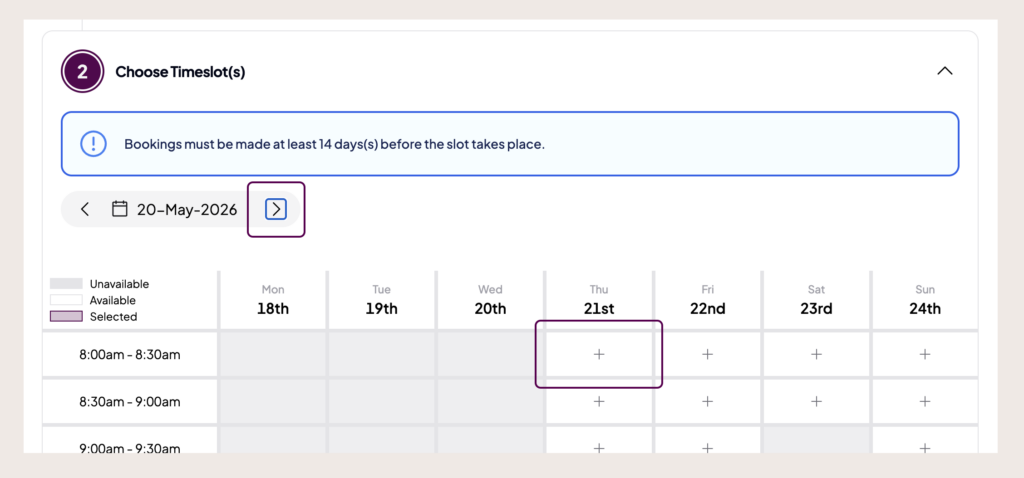
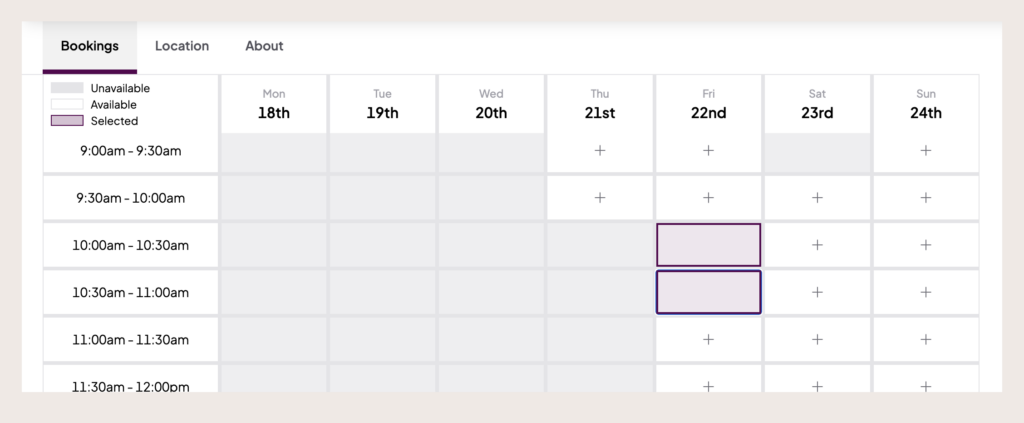
3. Select the duration you need to make a booking. Each block represents 30 minutes. Make sure you select all blocks needed to make up your desired duration.
Example: to make a one hour booking between 10am and 11am, select the 10am to 10:30am block, and the 10:30am to 11am block.
4. Click add to basket once you are happy with your selected duration. You will be taken to your basket.
5. Check the details of your booking are correct. If they are correct and you would like to continue, you must complete the booking form and checkout process within 30 minutes.
If the details are not correct, remove the booking from your basket and start again.
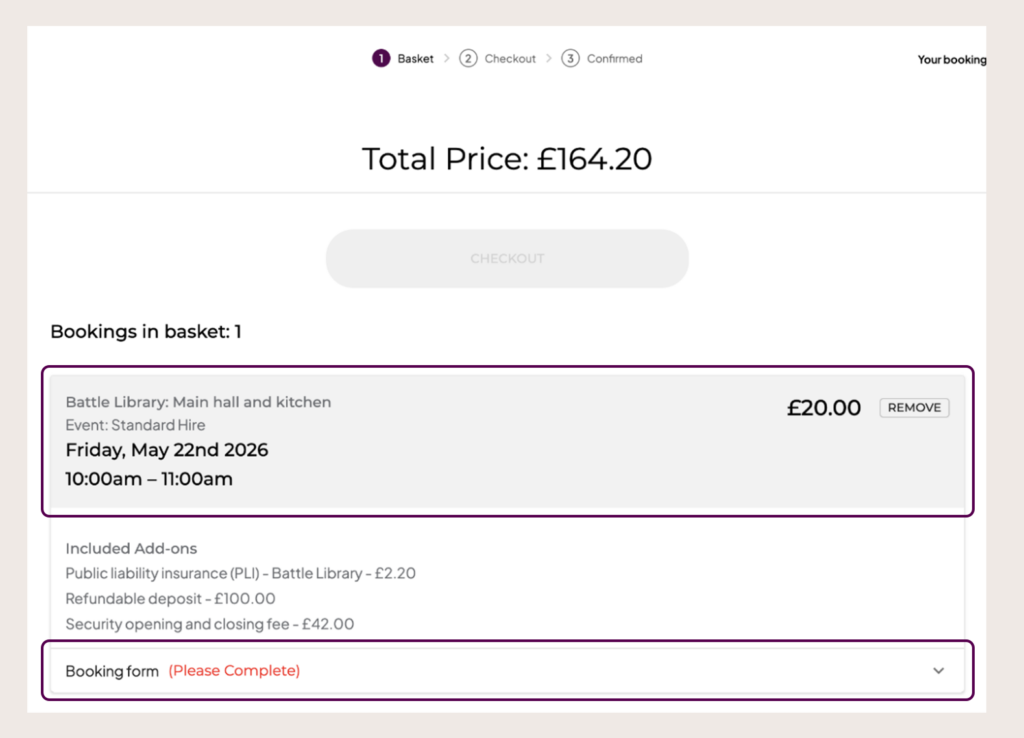
6. Complete the booking form by selecting the booking form dropdown and click ‘save’.
7. Proceed to checkout by scrolling back up to the top of the page, and select the ‘checkout’ button.
8. Proceed to payment by selecting the “continue to Civica Pay button” or, if you are a member, you can choose ‘offline payment’. This means you will be invoiced instead.
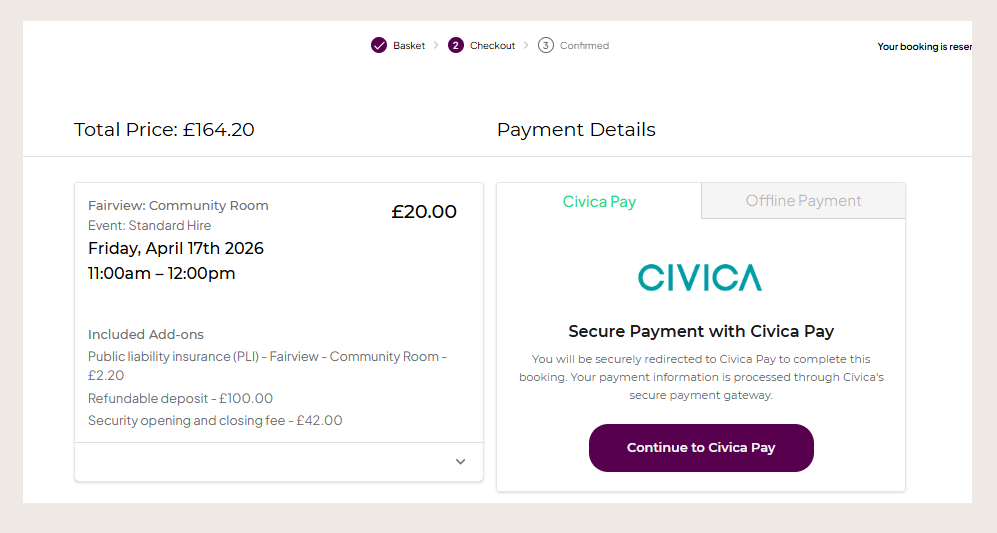
9. Check your email inbox for your booking confirmation email.
10. Send the required documents for your booking to the email address noted in your booking confirmation email. Your booking will not be processed or confirmed until we have received the documents.
View your bookings
To view your bookings, first make sure you are logged in to online bookings.
- Select the profile icon in the top right corner
- Select ‘bookings’ from the available options
- Use the menu at the top of the page to view different types of bookings
If you have made individual bookings, they will show under ‘bookings’.
If you have repeat or frequent bookings as part of a membership, they will show under ‘subscriptions’.
Make a change to a booking
If you’d like to make a change to a booking, please contact the bookings team.
We may not be able to make the change to the original booking. In this case, we will cancel the original booking and help you to make a new one with the correct details.
Cancel a booking
Please read our cancellation policy in the community spaces terms and conditions of hire before requesting a cancellation.
To cancel a booking, first make sure you are logged in to online bookings.
- Select the profile icon in the top right corner
- Select ‘bookings’ from the available options
- Click on the booking you wish to cancel and select cancel from the actions menu
- Add your reason for cancellation and click submit
You can also request a cancellation by emailing cancel.bookings@reading.gov.uk. Your email must include:
- the name of the community space
- the room hired
- the booking date and time
- the name the booking was made under
- any supporting information
Frequent hire membership
The new online booking system helps to manage repeat and regular bookings more effectively by offering community space memberships.
Frequent hire membership is for individuals and groups who use the space regularly and need flexible, self-managed access.
As a member, you will have your own keys or access card so you can open and lock the building yourself. Security opening and closing fees do not apply, and you will not need to pay the £100 deposit required for one-off bookings.
Who can apply for membership
You can apply for frequent hire membership if you plan to make four or more bookings at this venue within a 12 month period. Membership is ideal for:
- weekly or monthly classes
- community groups
- clubs and social groups
- repeat bookings spread throughout the year
Becoming a member
You can apply to become a member at your preferred community space via the online booking system. Please read the membership application information carefully before your start the application form.
If you already hire a venue regularly, you will have been given membership at that venue when we set up the new system. You may have received an email to confirm this.
Become a memberContact the bookings team
You can contact the bookings team using the enquiry button on the new booking system.
You need to claim your account and log in before you can submit an enquiry.
In your enquiry, you should include:
- your name
- your booking details (if you have one)
- a description of your enquiry
Last updated on 24/07/2026
Community centre bookings support